
Conversations that stay together
Use project channels, direct messages, and threaded replies, with pins and saved messages for the details you want to return to.
ThreadoraA HAT application
Project communication
Threadora gives construction teams a shared place to talk, ask questions, and follow project decisions. Connect office and site conversations with project hubs, field updates, RFIs, and drawing revisions.
Threadora is invite-only. Sign in with your existing account, ask your workspace administrator for an invitation, or contact HAT about a new workspace.
Explore the screenshots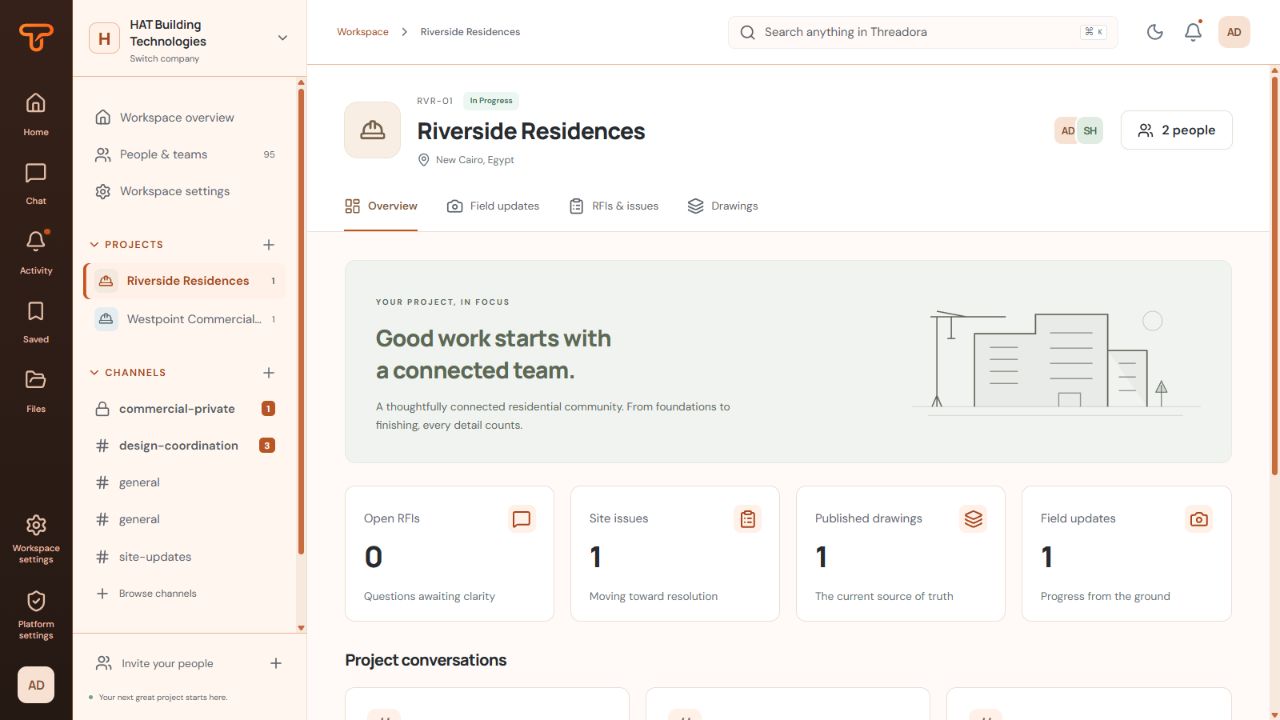
One place for the conversation and the work it belongs to.
A clearer way to work
Use project channels, direct messages, and threaded replies, with pins and saved messages for the details you want to return to.
Give RFIs and site issues a number, an assignee, and a status. Keep the answer history attached to the question.
Find the current published drawing and its earlier revisions alongside the project's conversations and field updates.
A project in Threadora
From the first question to the drawing it refers to, keep the people and the working context connected.
Bring project channels, field updates, RFIs, site issues, and the drawing register into one place the team can return to.
Talk in the appropriate channel or direct message. Use replies for focused discussion, attach the relevant files, and pin the details that matter.
Return to an item's answer history or a drawing revision. Search messages, items, updates, and filenames, then narrow the results by project or date.
Inside Threadora
These real Threadora screens use fictional projects and demonstration accounts to show the project hub, team conversation, and drawing register.
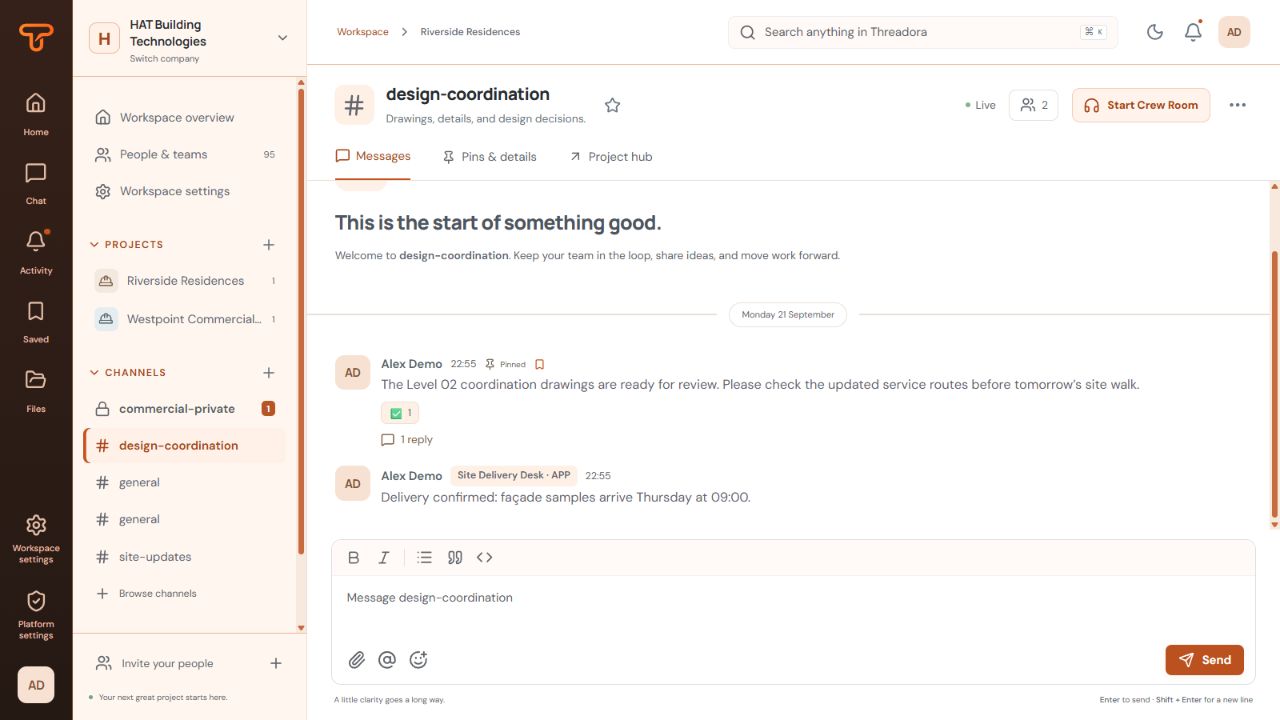
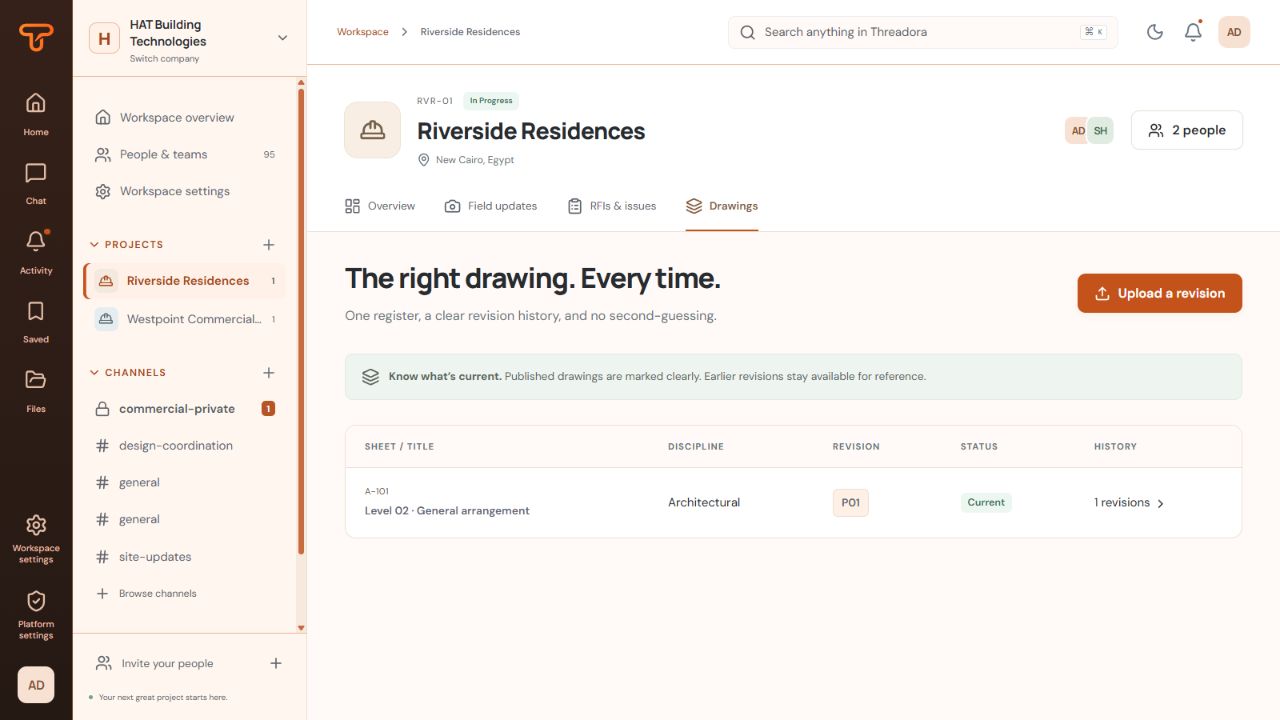
Captured from an isolated local Threadora demo with synthetic projects and demonstration accounts. No production workspace, customer records, or personal contact details are shown.
Picture Threadora in your workflow.
Talk about ThreadoraBuilt into Threadora
Bring project channels, messages, site updates, RFIs, and drawing revisions together so conversations stay connected to the work.
Conversations
Use channels, direct messages, and threads to keep the right people and the right details together.
Project hubs
Open one project to find its channels, field updates, RFIs, site issues, and drawing register.
RFIs & site issues
Give questions a number, an assignee, and a status, with answer history that stays with the item.
Drawing revisions
Keep published drawings and earlier revision files in a register that makes their status visible.
Field updates
Record updates from the work and review them alongside the conversations and open items they inform.
Search
Search messages, items, updates, and filenames, then narrow the results by project, channel, person, type, or date.
Find your fit
Construction and contracting · Architecture and engineering coordination · Building services and specialty trades
A question on site, a drawing discussion, and an office decision can all belong to the same piece of work. Threadora brings these conversations into project channels and shared project hubs, giving the team a place to return to when it needs the context.
Public and private channels support different working groups. Direct and group messages handle focused conversations, while replies keep a discussion attached to the original message. Pins, saved messages, reactions, drafts, and attachments support the everyday details of communicating as a team.
Each project hub connects its conversations with field updates, RFIs, site issues, and drawings. People can move from a discussion to the relevant project work without losing the wider context.
Field updates provide a record of what is happening. Numbered requests for information and site issues give questions an assignee and a status, and preserve answer history as the work develops.
The drawing register makes a published revision visible and retains earlier revision files for reference. Search covers messages, item text, field updates, and filenames, with filters for the project, channel, person, date, and kind of information you need.
That gives teams several ways to return to a decision: through the conversation, the project item, the drawing, or a focused search.
Threadora is an invite-only application. Project membership and channel access determine which conversations and files a person can see. The interface supports desktop and mobile use, with light and dark appearance options.
If your team already uses Threadora, sign in with your existing account. To discuss a new workspace, get in touch with HAT.
Before you begin
Get a clearer picture of Threadora before your next step.
Ask us a questionThreadora is built for construction project managers, site teams, coordinators, designers, and the office teams supporting them. It gives project conversations a home beside the questions, updates, and drawings they refer to.
Each project connects its channels with field updates, RFIs, site issues, and a drawing register. Teams can move from a discussion to the related project context, with membership and channel access determining what each person can see.
Search covers messages, project items, field updates, and filenames. Filters help narrow results by project, channel, person, date, and information type. Pins and saved messages provide another way to return to useful details.
The drawing register identifies the current published revision and retains earlier revision files for reference. Publication is controlled, so the team can distinguish a published drawing from other revisions.
Threadora requires an invitation. If your company already uses it, ask your workspace administrator for access and sign in with your account. Contact HAT to discuss a new workspace for your team.
Your next step with Threadora
Tell us how your office and site teams communicate. We'll discuss how Threadora could fit the way your projects work.