
Relationships with context
Keep contacts, companies, linked relationships, and owners together, with searchable directories built for everyday use.
BuildOSA HAT application
Construction CRM & operations
BuildOS brings your customer relationships and operational work into one organized workspace. Follow opportunities through a visual pipeline, keep documents beside the deal, and give the next task a clear owner.
Already have access? Sign in with your BuildOS account. For a new team workspace, contact HAT to discuss your workflow.
Explore the screenshots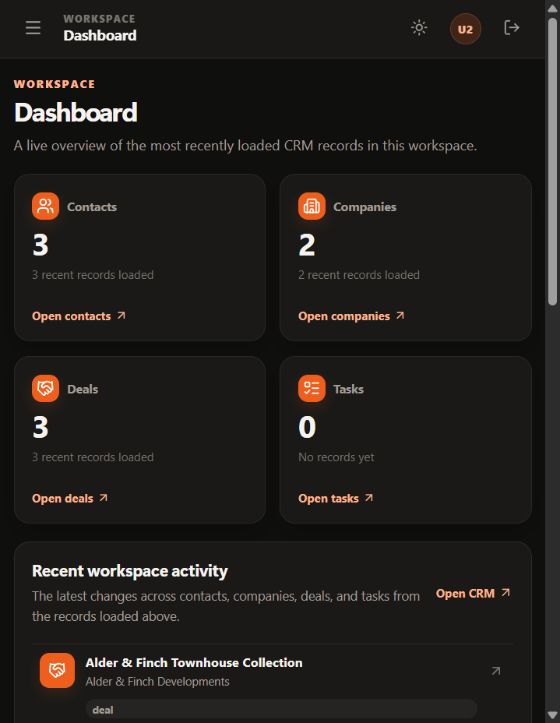
From the first contact to the next clear action.
A clearer way to work
Keep contacts, companies, linked relationships, and owners together, with searchable directories built for everyday use.
See opportunities by stage, then open the deal to find its notes, calls, relationships, and documents.
Give work a place to move forward through tasks, checklists, comments, and record-quality reviews.
A day in BuildOS
Move between the people, the deal, and the next action in a shared construction workspace.
Start with contact and company records. Link the relationships, assign ownership, and bring the relevant business details into view.
Open an opportunity from the pipeline. Follow its stage, review activity, add working notes, and keep categorized documents beside the discussion.
Use tasks and checklists for follow-up. Review missing details and ownership in Company Health when a record needs attention.
Inside BuildOS
Explore authentic BuildOS screens from the fictional Northstar demo. The dashboard, deal stages, and contact directory show the foundations of the workspace.
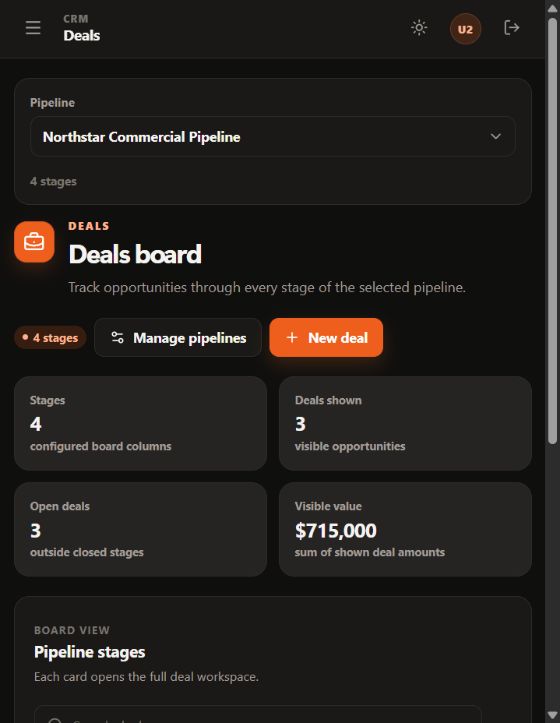
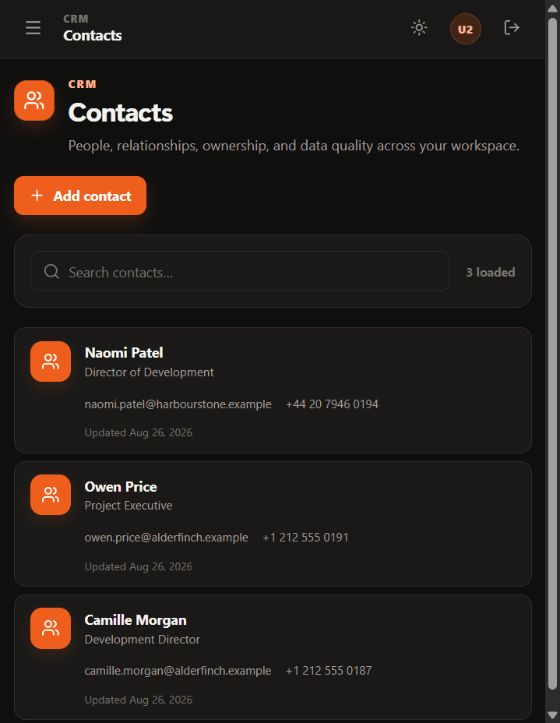
Captured in a controlled BuildOS demo using fictional Northstar records and reserved example contact data. No customer records are shown. These captures show an earlier interface version.
Picture BuildOS in your workflow.
Talk about BuildOSBuilt into BuildOS
Keep contacts, companies, deals, documents, and daily follow-up connected in a workspace built around construction teams.
Contacts & companies
Search your directories, open linked records, and keep the owner and business context easy to find.
Visual pipeline
Move from the pipeline board into a deal workspace with its stage, properties, relationships, and activity together.
Deal workspace
Bring working notes, call history, linked contacts, and categorized documents into the same conversation.
Record quality
Review missing information, relationship completeness, and owner workload across companies, contacts, and deals.
Tasks & checklists
Set out the work with tasks and checklists, then keep comments and activity alongside it.
Form builder
Create forms from starters, publish a shareable link, and review responses with the original questions preserved.
Find your fit
Construction and contracting · Building services · Specialty trades
An opportunity starts with a conversation, then gathers people, documents, decisions, and work. BuildOS gives those details a shared home so a team can understand what is happening without rebuilding the story from scattered notes.
Start with a company or contact, connect the relevant relationships, and keep ownership clear. Searchable directories and configurable columns help teams bring the information they use most into view.
The deal board puts opportunities into their configured stages. Open a deal to see its properties, linked relationships, and activity in a dedicated workspace. Working notes and call logs stay with the opportunity, while categorized documents can be uploaded, previewed, and downloaded by permitted users.
This makes the product useful at two different levels: a quick view of the pipeline and a closer view of the work behind one opportunity.
Tasks provide a place for the next action, with checklists, comments, and an activity history. Company Health brings missing fields, relationship completeness, and owner workload into a separate review so teams can decide which records need attention.
For information that needs to come in a consistent format, the form builder offers reusable starters, a page-based editor, published links, and response exports. Teams can review a response together with the questions that were asked.
BuildOS is designed for construction sales, operations, and account coordination. Workspace administrators manage invitations and module permissions, and the information someone can work with depends on their assigned access.
Already have an account? Use the sign-in link. To discuss BuildOS for your team, tell us about your workflow.
Before you begin
Get a clearer picture of BuildOS before your next step.
Ask us a questionBuildOS is designed for construction sales, business development, operations, and account coordination. It brings customer relationships, opportunities, documents, and follow-up into a shared working context.
A deal workspace brings together its stage, properties, linked contacts and companies, and activity. Permitted users can work with notes, call logs, and categorized documents without leaving the opportunity context.
Tasks support checklists, comments, and an activity history. Company Health provides a separate view of missing record details, relationship completeness, and owner workload so teams can decide what needs attention.
The form builder provides reusable starters and a page-based editor. Teams can publish a form link, review responses alongside the original questions, and export responses for further review.
Contact HAT to discuss your team's workflow and BuildOS access. If you already have an account, use the sign-in link. Workspace administrators manage invitations and module permissions.
Your next step with BuildOS
Tell us how your team handles customer relationships, deals, and follow-up. Let's explore where BuildOS fits.